Automating API & Database Operations
Modern applications often depend on multiple systems — APIs, databases, authentication services, and business logic. Connecting these systems traditionally requires custom code, API handling, database queries, error handling, and ongoing maintenance.
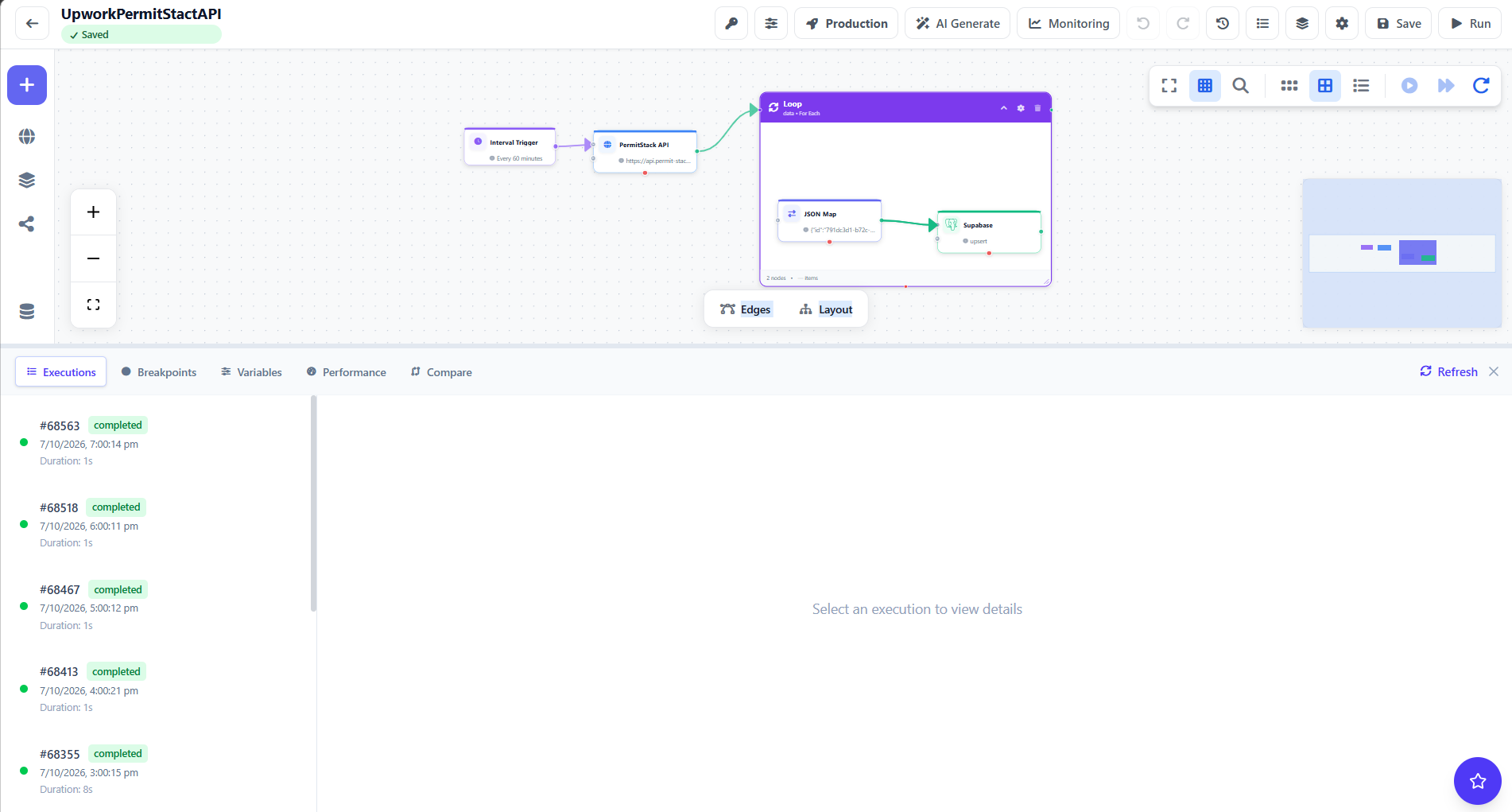
This case study demonstrates how Unodeskly simplifies that process by creating a visual workflow that connects an API with Supabase and PostgreSQL. The goal was a reusable database automation workflow that can receive API data, process it, and perform database operations — without building a separate integration service from scratch.
The Challenge
The workflow required communication between an API and a PostgreSQL-based database environment. A traditional implementation could require:
- Custom API integration code
- Authentication and credential management
- PostgreSQL connection handling
- SQL queries and data processing
- Error handling
- Workflow orchestration
- Logging and monitoring
- Additional backend infrastructure
Managing these components independently increases development time and maintenance effort.
The Solution: Unodeskly Workflow Automation
Using Unodeskly, the workflow was designed visually by connecting the required integration and database operations. Instead of creating a standalone integration application, each step is represented as a workflow node and executed as a single automated process:
Supabase Integration
Supabase provides a PostgreSQL database along with additional backend capabilities. In this workflow, Unodeskly connects with the Supabase environment and works with the underlying PostgreSQL database. That makes it possible to build workflows that can:
- Read database records
- Insert new data
- Update existing records
- Process API responses
- Connect database operations with other workflow steps
PostgreSQL Integration
PostgreSQL is widely used for SaaS applications, enterprise systems, ecommerce platforms, and data-driven applications. The PostgreSQL integration lets database operations become part of a larger automation workflow — for example: API Request → Validate Data → PostgreSQL Query → Process Result → Next Workflow Step.
This allows database operations to participate directly in business automation instead of remaining isolated inside application code.
Why This Approach Matters
The biggest advantage of this architecture is reusability. Instead of developing the same API-to-database integration repeatedly, teams can create workflows that can be modified, extended, and reused. Additional steps can be added later, such as conditional logic, data transformation, HTTP requests, notifications, CRM updates, AI processing, logging, error handling, and scheduled execution — turning a simple database integration into a complete automation pipeline.
Business Impact
Faster Integration Development
Build API and database workflows visually instead of coding every integration from scratch.
Reusable Workflows
Create workflows that can be reused across different business processes.
Centralized Automation
Keep API, database, processing, and business logic in a single workflow environment.
Easier Maintenance
Modify individual steps without rebuilding an entire integration service.
Use Cases
This type of workflow is useful for SaaS applications, ecommerce platforms, CRM automation, customer and product data synchronization, backend automation, API-to-database integrations, data processing pipelines, business process automation, and internal enterprise tools.
Conclusion
This case study shows how Unodeskly can connect APIs, Supabase, and PostgreSQL into a single automated workflow. What traditionally requires custom integration code and multiple backend components becomes a visual workflow that is easier to understand, modify, and extend. As organizations increasingly rely on APIs and multiple data sources, workflow-based integration provides a practical way to connect systems while reducing repetitive development effort.